Marketing and Analytics
Turning your Auto-ML scores into actionable event insights, without writing a single line of code.
The Problem We Were Solving
If you've been working with behavioral analytics, you know the frustration. Your data science team spends weeks building a churn prediction model. The scores land on the user profile. And then they stay there — locked in a silo, disconnected from the actual behavioral data that made them valuable in the first place.
You wanted to ask questions like: Do high-churn-risk users engage with our app differently before they leave? Which events are correlated with users who have a high LTV score? Are users our model flagged as high-risk actually clicking on retention touchpoints?
Until now, answering these questions required custom SQL, an analyst, and a few days of lead time. Not anymore.
What's New in B2Metric IQ Analytics
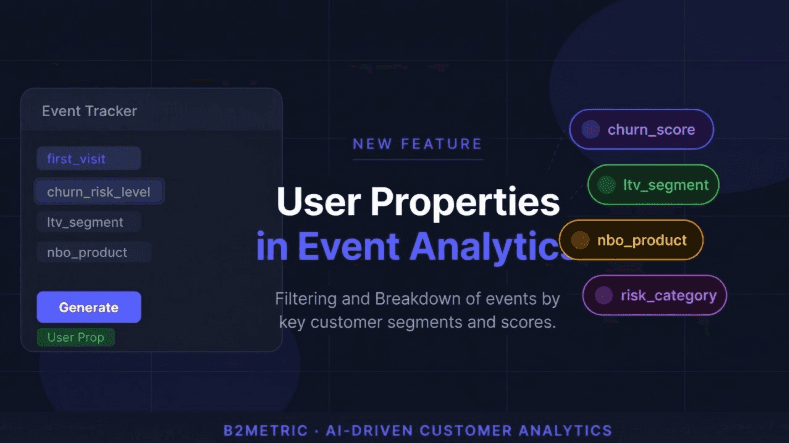
We've just shipped a significant update to the Event Tracker inside B2Metric IQ Analytics: User Properties — including your Auto-ML scores — are now available as filters and breakdown dimensions directly within event analysis.
This means any user-level attribute that lives on the user card can now be used to slice, filter, and segment your event data in real time.
Here's what you can now do:
Filter events by user properties — narrow down any event analysis to a specific user segment. Want to see only first_visit events from users flagged as High churn risk? Two clicks. No SQL. No waiting.
Break down event metrics by user properties — see your event counts, unique users, and conversion rates split across churn levels, LTV segments, or any other user attribute, side by side in a single chart.
Use Auto-ML scores as dimensions — B2Metric's Auto-ML engine continuously writes computed scores (churn_score, ltv_score, risk_score, nbo_product) directly to the user profile. These scores are now first-class citizens in event analytics.
All properties are sourced from a Single Source strategy via B2Metric's internal data pipeline — always fresh, always consistent, and always in sync with the latest model runs.
A Real-World Example
Let's say you're a growth analyst at a subscription business. You want to understand whether high-churn-risk users are actually engaging with your win-back campaign touchpoints.
Before this update: export event data, join it with a user scoring table in your data warehouse, write an aggregation query, build a chart in a BI tool. Best case: half a day.
With this update: open Event Tracker in B2Metric IQ, select your event (e.g., promo_banner_clicked), add a filter for churn_risk_level = High, add ltv_segment as a breakdown. You get your answer in 30 seconds — and it stays live as new data flows in.
That's not a small productivity gain. That's a fundamentally different way of working.
Why This Matters for AI-Driven Analytics
At B2Metric, we've always believed that the value of a predictive model isn't in the score itself — it's in what you do with it downstream. A churn score sitting in a database helps no one. A churn score that shapes how you analyze behavior, personalize experiences, and prioritize interventions? That's where the ROI lives.
Connecting Auto-ML outputs directly into event analytics closes the loop between prediction and behavior. It allows product, growth, and CRM teams to act on model outputs without needing to go through data engineering every single time.
This is what we mean by AI-driven analytics — not just running models, but embedding their outputs into every layer of the analytics workflow.
What's Coming Next
This update is the first step in a broader initiative to make user intelligence available everywhere in B2Metric IQ. In the coming releases: funnel analysis with user property segmentation to see where high-risk users drop off in your conversion funnel, cohort analysis by Auto-ML segments to track how churn-risk cohorts evolve over time, and alerting on user property shifts to get notified when a segment's behavior changes significantly.
Get Started
If you're already on B2Metric IQ, head to Insights → Event Tracker, open any event, click Add Filter, and select the User property type. Your Auto-ML scores and user attributes will be right there.
If you'd like a personalized demo showcasing this feature for your specific use case — whether it's churn reduction, NBO activation, or LTV segmentation — reach out to us at b2metric.com.